Colors#
This page lists some specific colors (like robot default colors), in hex and RGB format.
Paint Tool Colors#
The list below the image contains the hex and RGB
color code for each of the paint tool's colors.
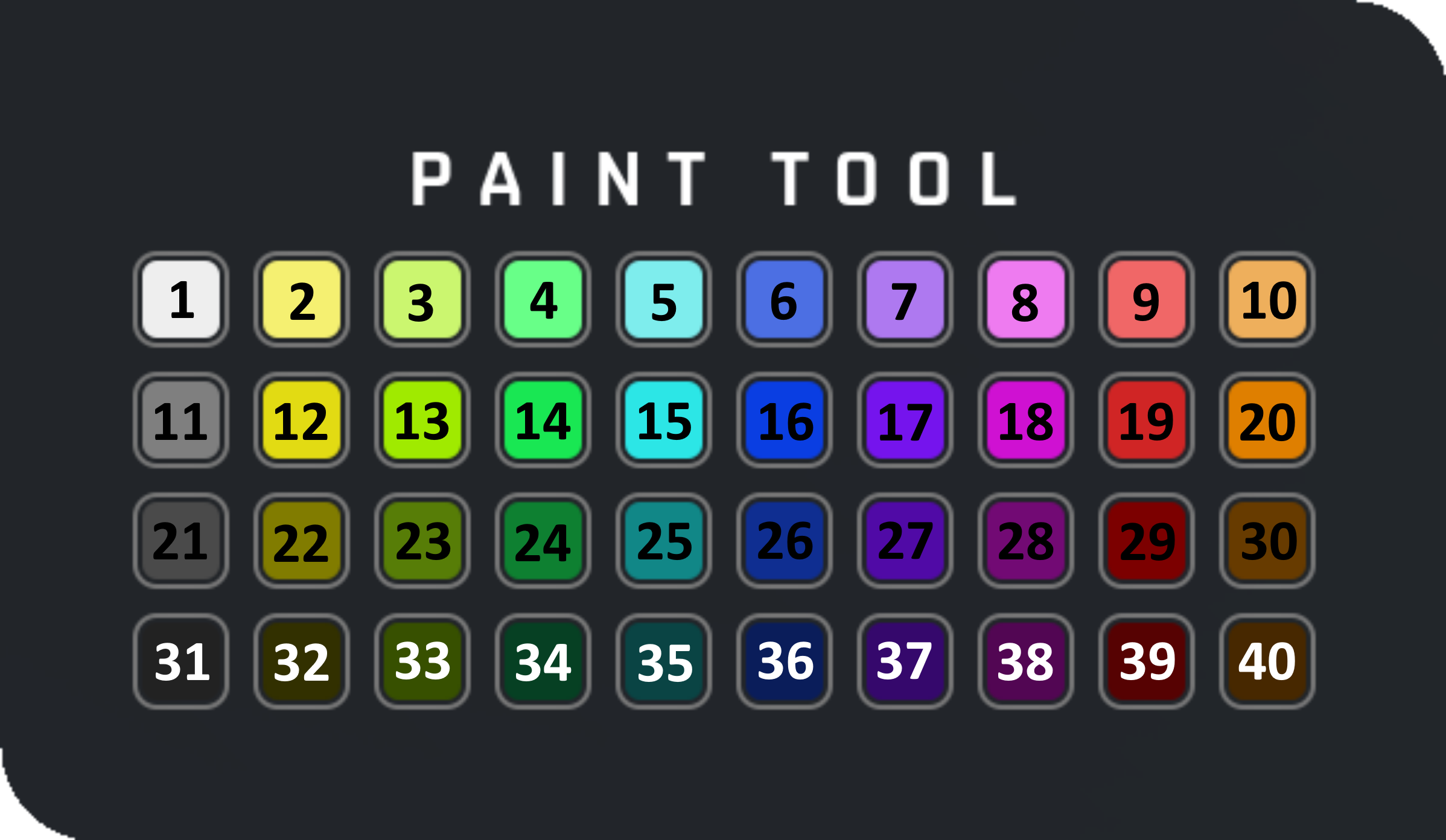
| Color | Hex Color | RGB Color | Color | Hex Color | RGB Color | |
|---|---|---|---|---|---|---|
| 1 | #eeeeee | 238, 238, 238 | 21 | #4a4a4a | 74, 74, 74 | |
| 2 | #f5f071 | 245, 240, 113 | 22 | #817c00 | 129, 124, 0 | |
| 3 | #cbf66f | 203, 246, 111 | 23 | #577d07 | 87, 125, 7 | |
| 4 | #68ff88 | 104, 255, 136 | 24 | #0e8031 | 14, 128, 49 | |
| 5 | #7eeded | 126, 237, 237 | 25 | #118787 | 17, 135, 135 | |
| 6 | #4c6fe3 | 76, 111, 227 | 26 | #0f2e91 | 15, 46, 145 | |
| 7 | #ae79f0 | 174, 121, 240 | 27 | #500aa6 | 80, 10, 166 | |
| 8 | #ee7bf0 | 238, 123, 240 | 28 | #720a74 | 114, 10, 116 | |
| 9 | #f06767 | 240, 103, 103 | 29 | #7c0000 | 124, 0, 0 | |
| 10 | #eeaf5c | 238, 175, 92 | 30 | #673b00 | 103, 59, 0 | |
| 11 | #7f7f7f | 127, 127, 127 | 31 | #222222 | 34, 34, 34 | |
| 12 | #e2db13 | 226, 219, 19 | 32 | #323000 | 50, 48, 0 | |
| 13 | #a0ea00 | 160, 234, 0 | 33 | #375000 | 55, 80, 0 | |
| 14 | #19e753 | 25, 231, 83 | 34 | #064023 | 6, 64, 35 | |
| 15 | #2ce6e6 | 44, 230, 230 | 35 | #0a4444 | 10, 68, 68 | |
| 16 | #0a3ee2 | 10, 62, 226 | 36 | #0a1d5a | 10, 29, 90 | |
| 17 | #7514ed | 117, 20, 237 | 37 | #35086c | 53, 8, 108 | |
| 18 | #cf11d2 | 207, 17, 210 | 38 | #520653 | 82, 6, 83 | |
| 19 | #d02525 | 208, 37, 37 | 39 | #560202 | 86, 2, 2 | |
| 20 | #df7f00 | 223, 127, 0 | 40 | #472800 | 71, 40, 0 |
Default Character Colors#
The list below contains the default colors of all paintable characters.
Characters that are not paintable are not in the list.
| Character | Hex Color | RGB Color |
|---|---|---|
| Green Totebot | #49642d | 73, 100, 45 |
| Haybot | #e75b0f | 231, 91, 15 |
| Tapebot | #035cff | 3, 92, 255 |
| Red Tapebot | #ec1919 | 236, 25, 25 |
| Farmbot | #c52c18 | 197, 44, 24 |
Interactables Connection Colors#
Listed below are the normal and highlighted connection point colors of all vanilla interactables.
note
These values were taken from the game by extracting the color out of a screenshot.
If you want to do this yourself, you need to make sure that Godrays are turned OFF and
that Brightness is set to 0. If either one of these settings is changed, the extracted color
will be different.
| Interactable | Color | Highlight Color |
|---|---|---|
| Bearings | ||
| Seats | ||
| Switches | ||
| Buttons | ||
| Logic Gates | ||
| Timers | ||
| Robot Heads | ||
| Decor | ||
| Guns/Cannons | ||
| Lights | ||
| Pistons | ||
| Sensors | ||
| Controllers | ||
| Thrusters | ||
| Driver Seats | ||
| Engines | ||
| Cash Register | ||
| Radio | ||
| Other |